POS, ERP, and e-invoicing in one simple system.
Sell, invoice, and manage stock, purchases, and employees from the web, Windows, or Android.
Try it
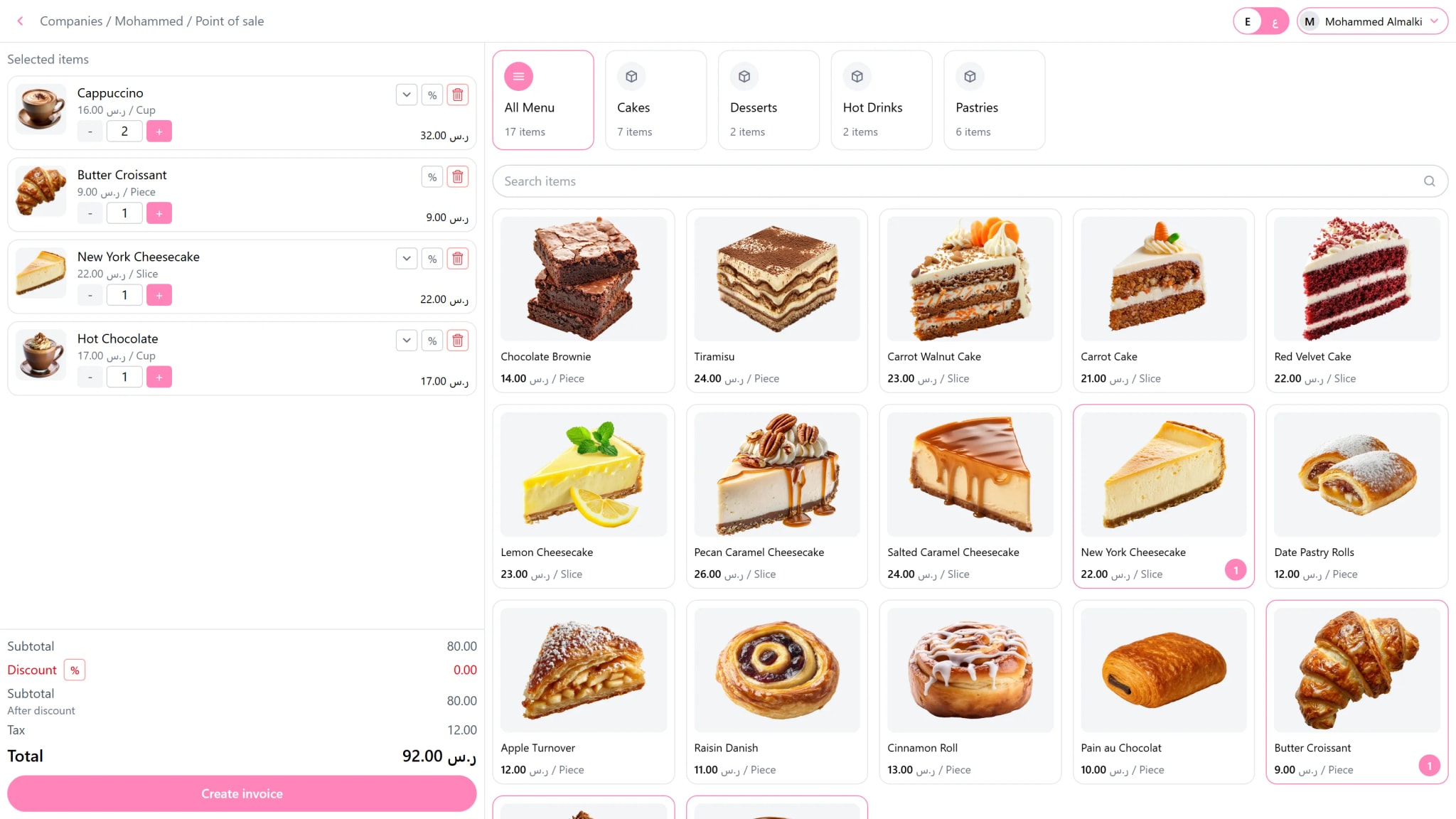
Tap items to add them to the invoice.
Features
Point of Sale
The point of sale is the screen your business lives on, so Alkaml keeps it simple: your items with their photos on one side, the invoice on the other. Tap an item or scan its barcode, set the quantity, choose the modifiers, and create the invoice. A new cashier can do this on the first day without training.
Barcode scanning
Scan with any keyboard style scanner and the item lands on the invoice. If two items share a code, the screen asks which one you meant.
Categories and search
Browse by category with one tap, or search by name, SKU, or barcode across your whole catalog.
Modifiers and options
Extra cheese on an item, table 5 on the invoice. Modifiers carry their own price and options are printed on the receipt.
Item and invoice discounts
Percentage or fixed discounts on a line or the whole invoice, limited for each employee so nobody gives away more than you allow.
Cash and card
Take cash, or send the exact amount to a connected mada terminal so nobody retypes it.
Customers at the counter
Pick a customer or create one without leaving the sale, with the fields a tax invoice needs.
Printing to many printers
One sale can print a receipt at the counter and a ticket in the kitchen, each with only the items it should show.
Sells with no internet
On Windows and Android the sale is stored on the device first and sent to the server as soon as there is a connection.
Invoices and Returns
Every invoice in Alkaml keeps a snapshot of the moment it was issued: the company details, the customer, the prices, the tax, and who made the sale. Changing an item's price tomorrow never rewrites yesterday's invoice, which is exactly what you want when an accountant or an auditor asks.
Sequential numbers
Each device has its own number and sequence, so numbers never collide even when devices work offline.
Automatic VAT
Tax is computed per line with consistent rounding, before and after discounts.
Totals and filters
Filter by date, customer, or the employee who sold, and see the totals at the top of the list.
Returns by line
Partial or full returns, with the remaining quantity tracked for every line.
Reprint any time
Open any invoice and print it again on any printer, in English or Arabic.
Every device in one view
See the invoices of each device, or all of them together, wherever they were issued.
ZATCA E-Invoicing
In Saudi Arabia every taxpayer must issue electronic invoices under the rules of the Zakat, Tax and Customs Authority (ZATCA). Alkaml covers both phases. In phase 1 the compliant QR code is generated with every invoice. In phase 2 each device connects to ZATCA with its own certificate, then signs every invoice and reports or clears it.
Phase 1 QR code
Seller name, VAT number, time, total, and tax encoded the way ZATCA specifies.
Phase 2 integration
Connect each device with a one time password, in the simulation or production environment.
Signing and the invoice chain
Each invoice is signed, hashed, counted, and chained to the one before it.
Reporting and clearance
Simplified invoices are reported and standard tax invoices are cleared.
Credit notes
Returns become compliant credit notes linked to the original sale.
Exemptions and foreign currency
Zero rated and exempt items with their reason codes, and tax amounts in riyals for other currencies.
Unsent invoices
A clear list of what ZATCA has not accepted yet, with the reason and one button to send it again.
A full history of attempts
Every answer from ZATCA is kept, including warnings, so you can always show what happened.
Card Payments
Typing the total into a card machine is where counters lose money: a slip of one digit and the books no longer match. Alkaml's Windows and Android apps talk to the mada terminal directly over its USB cable, so the exact total goes to the terminal and the approval comes back to the invoice.
Amount sent automatically
The invoice total goes to the terminal, so nobody types it twice.
Protection from double charges
A lost answer is recovered from the terminal instead of being sent again.
Refunds through returns
A card sale is refunded to the card through its return, linked to the original payment.
A record of every payment
Scheme, approval code, reference number, and terminal for each transaction.
Works offline
Card records wait on the device and upload with the sale.
Find the terminal automatically
Plug in the cable and search for it from the Payment terminals page.
Receipts and Printers
Every business wants its receipt to look a certain way, so every part of Alkaml's receipt is yours to decide: which sections appear, which fields they show, the font sizes, the paper width, and the margins. The preview next to the form shows the result before you print a single sheet.
Custom layouts
Show or hide every section and field and set its font size.
Any paper size
58 mm, 80 mm, A4, or your own width and margins.
Silent printing
No print dialog at the counter on the Windows and Android apps.
USB, Bluetooth, and network
Any printer your device can reach, including Android terminals with a printer inside.
Several printers per sale
Limit a printer to certain items to send tickets to the kitchen or the bar.
Barcode labels
Print labels for your items in the size of your label paper.
English or Arabic per printer
Each printer has its own language, with correct right to left layout.
Items and Catalog
Everything you sell lives in one catalog: a photo, a name, a price, a cost, a tax rate, a category, a unit, a SKU, and a barcode. Items you do not track, like a service or a fresh drink, can be marked unlimited so they never run out on the screen.
Photos and categories
A visual catalog on the cashier screen, grouped your way.
Price, cost, and tax
Each item has its own tax rate, and cost updates when a purchase is confirmed.
Units
Piece, kilogram, box, or any unit you define.
Modifiers
Priced extras attached to the items that offer them.
Options
Choices for the whole invoice, like the table number or dine in and takeaway.
Barcodes and printed labels
Unique codes, and labels printed on your own label paper.
Copy between companies
Bring items from another company you own in one step.
Inventory
A number on a screen is not inventory management. In Alkaml a quantity never changes on its own: each change is written to a ledger with its reason, who made it, when, and the quantity after it. When the shelf disagrees with the system, you can read exactly what happened.
A complete ledger
Opening, sale, return, purchase, purchase return, adjustment, and count.
Stock counts
Count item by item or load a whole category, and see each difference.
Adjustments with a reason
Breakage, samples, or corrections, always with a written reason.
Automatic movements
Sales, returns, and confirmed purchases move stock on their own.
Safe across devices
Late uploads from offline devices land on the right side of a count.
Search and filters
Filter movements by kind, date, or item.
Purchases and Suppliers
A purchase starts as a draft you can change freely. When the goods arrive you confirm it, and from then on it is final: stock goes up, each item's cost is updated from what you actually paid, and the amount becomes a balance with the supplier.
Drafts and confirmation
Prepare freely, then confirm once the goods are in.
Discounts and tax
Discounts share across lines to the cent, with tax per line.
Automatic cost
Item cost follows what you really paid.
Purchase returns
Send goods back, line by line, and stock adjusts itself.
Payments and refunds
Part payments by cash, transfer, or card, with a live balance.
Supplier profiles
Contact and tax details with a summary of every purchase.
Expenses
Rent, electricity, maintenance, and small cash payments disappear quickly when they live in a notebook. Alkaml gives each one a record with its category, date, amount, tax, payment method, and a photo or PDF of the receipt.
Your own categories
Organize costs the way you think about them.
Tax on expenses
Enter the amount and the rate, and the total is worked out.
Receipts attached
An image or PDF up to 10 MB on each expense.
Payment methods
Cash, bank transfer, or card, and who you paid.
Works offline
Record it now and the file uploads later.
Accounting Records
Most small businesses do not lose money in the accounting software. They lose it before that, in sales that were never recorded and receipts that were never kept. Alkaml captures the source of your numbers as the work happens: every invoice, every return, every purchase, every supplier payment, and every expense, each with its tax.
Sales and VAT
Every invoice with tax per line and totals for any period.
Returns as credit notes
Corrections linked to the sale they correct.
Supplier balances
What you bought, paid, returned, and still owe.
Expenses
Categorized, taxed, and with the receipt attached.
Stock value inputs
A ledger of quantities and a cost for each item.
Exact money arithmetic
The same rounding on every device, so totals always agree.
Customers (CRM)
Your customers should not live in a different program from your sales. In Alkaml each customer has a profile with contact details, identity numbers, a national address, and their own folder of documents, and you can pick them right at the counter.
Individuals and companies
The right fields for each type of customer.
Identity details
National ID, iqama, passport, and nationality.
National address
Building, street, district, and postal code in a structured form.
Documents per customer
Contracts and IDs in the customer's own folders.
Create at the counter
Add a customer in the middle of a sale, even offline.
Copy between companies
Bring customers from your other companies in one step.
Employees and Permissions
A cashier should sell, a store keeper should count stock, and neither needs to see the salaries. Alkaml's permissions go down to individual actions in each section, so you decide who can read, create, update, delete, return, or give a discount.
Permissions per action
Section by section and action by action, enforced on the server and on the device.
Discount limits
A maximum percentage or amount for items and for invoices.
Contracts and salaries
Job title, salary, allowances, and contract dates.
Who sold what
Every invoice names the person who issued it.
Personal documents
Folders for each employee's files.
Documents
The papers that run a business usually end up in chat threads and personal phones. Alkaml gives your company a real folder tree, and gives every customer and every employee their own tree too, so a contract sits with the person it belongs to.
Folders inside folders
Organize as deep as you need.
Three kinds of owners
The company, each customer, and each employee.
Large files
Up to 500 MB per file.
Permissions
Control who can view, add, change, or delete.
Offline Mode and Apps
Most cloud systems stop when the connection does, and the queue at your counter does not care why. Alkaml's Windows and Android apps keep their own database on the device: sales, returns, customers, items, purchases, expenses, and stock all work with no connection.
A real database on the device
Not a cache. The work is complete without a server.
Three connection modes
Offline, always online, or hybrid. You choose.
Nothing sent twice
Every record has its own identity, so a retry is harmless.
Sends while closed
Android waits for a connection in the background, even after a restart.
A clear queue
See what is waiting and fix what was refused.
Automatic updates
The apps update themselves from the website.
Accurate time
Invoices keep the correct time even if the device's clock is wrong.
Multiple Companies
Many owners run more than one shop. In Alkaml you create as many companies as you need under one account, and each one is fully separate: its own items, invoices, customers, employees, printers, and tax settings.
Unlimited companies
Every plan includes as many as you need.
Currency and time zone
Set per company.
Separate data
Nothing mixes between companies.
One device per counter
Each device has its own numbering in each company.
Copy what you already built
Reuse items and customers from another company.
Download
Windows
- Version
- 2.22.0
- Size
- 107.6 MB
- Requires
- Windows 10 or later
- 1. Download the installer and open it.
- 2. Open Alkaml from the desktop.
- 3. Sign in once with the internet on.
Android
- Version
- 2.15.0
- Size
- 1.2 MB
- Requires
- Android 8 or later
- 1. Download the app on the device.
- 2. Allow installing it if Android asks.
- 3. Sign in once with the internet on.
Questions
What is Alkaml?
Alkaml is a business management system that combines a point of sale, invoicing, inventory, purchasing, expenses, customers, employees, and documents in one place, on the web, Windows, and Android.
Who is Alkaml for?
Shops, cafes, restaurants, wholesalers, service businesses, and owners with several branches.
Which languages does it support?
English and Arabic, across the whole system and on the printed receipts, with full right to left layout.
Can I use it outside Saudi Arabia?
Yes. Each company chooses its own country, currency, and time zone. ZATCA e-invoicing only runs for companies that turn it on.
Is Alkaml an ERP or an accounting program?
It is a POS and ERP style system for daily operations: sales, tax, stock, purchases, and expenses. It does not include a general ledger, so your accountant keeps the final books from its records.
Is there a free trial?
Yes. Every new account starts with a free trial, with no card required.
Are the modules sold separately?
No. Everything is included in every plan.
Do I pay for each company or employee?
The subscription belongs to the owner and covers all their companies. Employees need no subscription of their own.
What happens when my subscription ends?
You keep your data, and you can continue as soon as you renew.
Can I delete my account?
Yes, at any time from your account page.
Which platforms are available?
Any modern browser, a Windows application, and an Android application.
Does it work with no internet?
The Windows and Android apps do. You sign in once online, and after that sales and most daily work happen on the device and are sent when a connection is available.
Will I lose sales if the app closes?
No. Sales are written to the device before anything else, and they stay there until the server has them.
Can several devices work at the same time?
Yes. Each device has its own invoice numbering, so they never collide.
Do the apps update themselves?
Yes. They check the website for a new version and offer to install it.
Is Alkaml compatible with ZATCA?
It implements phase 1 and phase 2, including signing, reporting, clearance, and credit notes.
How do I connect to ZATCA?
Generate a one time password from the Fatoora portal and enter it on the ZATCA page of the device. Each device integrates on its own.
Can I test before going live?
Yes. Devices can integrate with ZATCA's simulation environment first.
Does it work with foreign currencies?
Yes. You set the exchange rate, and tax amounts appear in riyals as ZATCA requires.
Which printers can I use?
USB, Bluetooth, and network receipt printers, A4 printers, label printers, and Android devices with a built-in printer.
Can I connect a barcode scanner?
Yes. Any scanner that behaves like a keyboard works at the point of sale.
Can I connect a card terminal?
Yes. Mada terminals connect over USB with the Windows and Android apps.
Who can see my company's data?
You, and the employees you add, within the permissions you give them.
What is kept on the device?
The apps keep what they need to work offline. Your sign-in session and ZATCA keys are stored encrypted by the operating system.